Status Hub App Update (v2.7) — April 2026
Status Hub v2.7
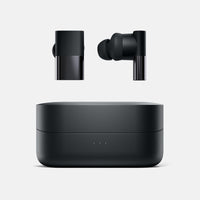
We've just released Status Hub version 2.7 for both iOS and Android, alongside a new firmware update (v0.1.6.3) for the Pro X. Together, these updates bring meaningful new controls, a noticeable audio improvement, and a handful of refinements that make the overall experience feel more polished and deliberate.
As always, our goal with Status Hub is simple: let the technology fade into the background so you can focus on the sound.
Toggle the Wearing Sensor On or Off
v2.7 adds the ability to disable the Wearing Sensor — also known as In-Ear Detection — directly from the Settings screen. This is available for Pro X users.
For users who prefer their audio to continue playing when a bud is removed from the ear, or who simply find the auto-pause behaviour disruptive, this toggle puts you in control. It's a feature many of you have asked for, and we're glad to finally have it in your hands.
Note that this feature requires both the v2.7 app update and the new Pro X firmware v0.1.6.3 to be installed — both are available now.
Disable Auto Trim in EQ Settings
v2.7 also introduces the ability to turn off Auto Trim — sometimes referred to as EQ Normalization — from the EQ Settings screen. This is available for Pro X users.
Auto Trim is the behaviour where EQ sliders shift automatically as you build a custom profile. It's designed to prevent distortion, preserve audio quality, and keep your sound balanced across the frequency range. While useful by default, some users — particularly those fine-tuning a very specific sound signature — prefer complete manual control over their EQ. You can now disable it entirely if that's your preference.
Stability Improvements and Bug Fixes
Alongside these updates, we've resolved several low-occurrence bugs and crashes across the app. While many users may never have encountered these issues, addressing them improves overall reliability and long-term stability — especially as we continue to grow the Status Hub device family.
——————
Pro X Firmware v0.1.6.3
The firmware update that ships alongside v2.7 brings several improvements to the Pro X itself.
+3dB gain increase
Audio output levels have been increased by +3dB across the board. If you've found yourself pushing the volume higher than you'd like, you should notice a welcome improvement in perceived loudness and headroom at more comfortable listening levels.
Smarter touch controls
Touch controls are now disabled for two seconds immediately after you insert or remove a bud from your ear. This prevents the accidental track skips and volume changes that can happen when your hand or ear grazes the touch surface in that moment.
Dynamic EQ fix and faster prompts
We've resolved a bug where Dynamic EQ would not always become enabled correctly. We've also reduced latency for prompt sound effects, which should now feel snappier and more in sync with the actions that trigger them.
Chipset SDK update and security fix.
This firmware includes an updated version of the Airoha chipset SDK. Alongside general improvements, this SDK update addresses a security vulnerability in the Bluetooth audio stack. We recommend all Pro X users install this update at their earliest convenience. Full details are available in the Airoha Product Security Bulletin.
——————
If you haven't already, we recommend updating to the latest version of Status Hub through the App Store and Google Play, and installing the firmware update via the app when prompted.
As always, thank you for being part of the Status Audio community — and for helping us make both our hardware and software better with every release.
— The Status Audio Team